Assembly equipment, such as conveyors and workstations, presents a particularly difficult challenge to configure. Designs must accommodate existing building layout and structural elements, while providing an ergonomic workspace for operators, and of course, meeting the needs of the manufacturing or assembly process.
Ron Schwar, design engineer for Glide-Line, points out that the conveyor is the backbone of most system designs, meaning that virtually any system change will affect the conveyor layout. “As the system evolves and the conveyor changes, dozens, if not hundreds, of parts and mates need to be updated. Keeping track of these changes and part numbers is a struggle for designers, and just one mistake can lead to expensive errors that cause part returns, reorders, and rework,” said Schwar.
To take the guesswork out of conveyor design and purchasing, Glide-Line has introduced the IMPACT (Interactive Modeling Program and Application Configuration Tools) system, which integrates into both Excel and SolidWorks.
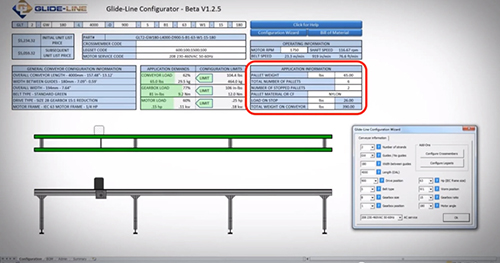
The Excel version of IMPACT shows the suitability of a conveyor to the user’s application, in the form of a graph indicating how close the requirements are to the conveyor’s threshold. Providing the information as a graph rather than a simple go/no-go signal lets the user see whether a conveyor or part is within the realm of their application, or if they need to choose a different model. And when the user changes a part, IMPACT gives instant graphic feedback as to what has changed – length, width, or motor orientation, for example–and generates up-to-date part numbers and pricing. With this real-time feedback and up-to-date bill of material, the risk of ordering the wrong parts, or parts that don’t fit, is virtually eliminated, putting an end to costly returns and rework.
IMPACT is also embedded within Glide-Line’s SolidWorks CAD model, where it enables in-context usage, with automatic updates. With over 600,000 configurations and almost infinite combinations of lengths, widths, and locations for drives, legs, and crossmembers, the user can configure the perfect solution for their application, but design iterations take time. IMPACT significantly reduces this time by eliminating the need to re-configure, download, insert, and repair CAD models after every change.
An early user of IMPACT was DeWayne Merritt of AutoLiv, who appreciated its ease of use and the accurate, detailed CAD files that the software provides. “It is not time effective to translate, draw/redraw from a spec sheet (whether paper or a pdf), or convert from 2D to 3D,” said Merritt. “Having a system that can validate a real part number then generate CAD is great. IMPACT takes it one step further in that I don’t have to re-download every time I have to make a change. I love having native SolidWorks files to integrate into my designs. I had previously never worked with a SolidWorks design table-driven part file. Normally a configurator is web based and generates an assembly or a generic CAD file that, when complete, still takes 15-20 minutes to download, open and then resolve any issues such as mates, model errors etc. Not with IMPACT.”
IMPACT has applications even after the sale. “For service purposes, a user can enter the conveyor part number into IMPACT’s Microsoft Excel tool and get a full bill of material, so there’s no confusion as to what repair or replacement parts should be,” said Schwar.
By reducing time, virtually eliminating the possibility for errors, and making the process more user-friendly, Glide-Line is making an IMPACT on conveyor design and configuration.

Leave a Reply
You must be logged in to post a comment.